> ## Documentation Index
> Fetch the complete documentation index at: https://docs.scorecard.io/llms.txt
> Use this file to discover all available pages before exploring further.
# RAG Quickstart
> Evaluate a Retrieval Augmented Generation (RAG) agent with Scorecard in minutes.
RAG pairs retrieval with generation so your LLM can answer using fresh, domain‑specific context. This quickstart shows how to evaluate a simple RAG loop using Scorecard’s SDK, then highlights how to extend to retrieval‑only and end‑to‑end tests.
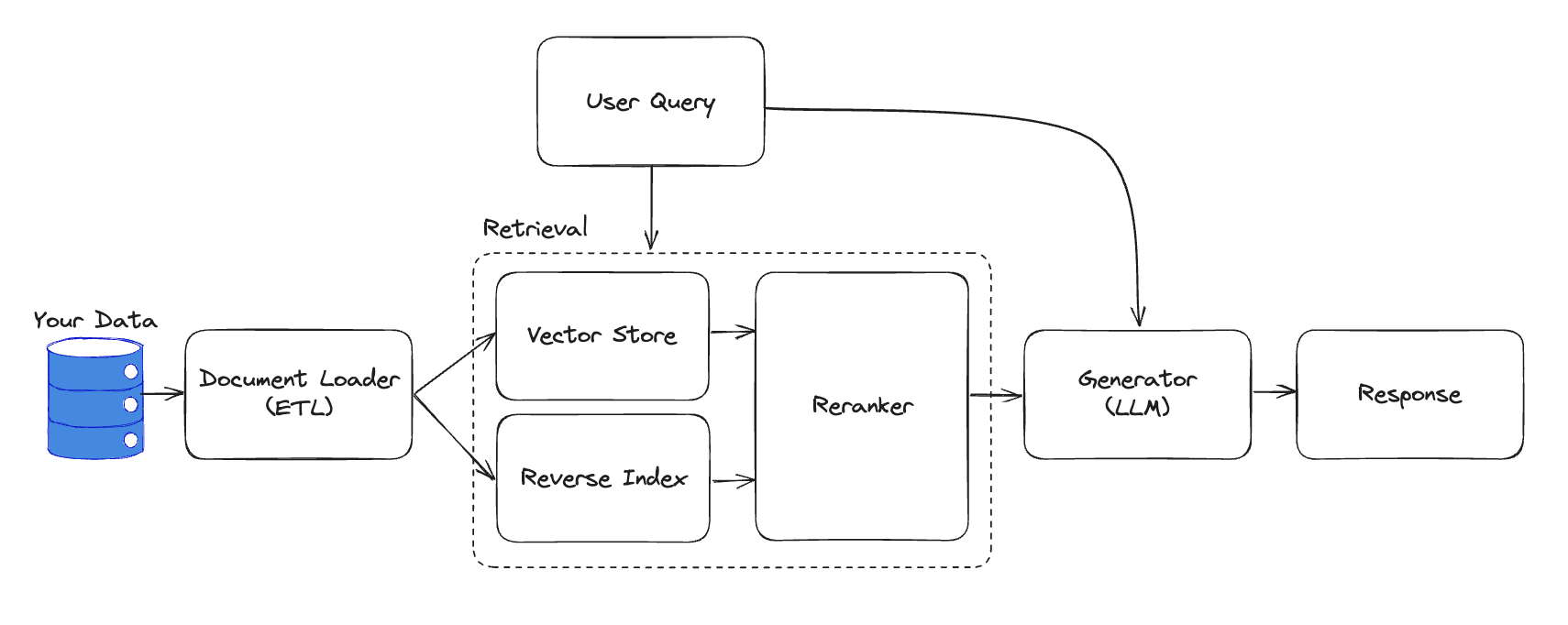 We’ll simplify to the core pieces you need to test:
 Already familiar with the SDK? You can reuse patterns from the [SDK Quickstart](/intro/quickstart) and [Tracing Quickstart](/intro/tracing-quickstart).
## Steps
Create a [Scorecard account](https://app.scorecard.io/dashboard), then set your API key as an environment variable.
```sh theme={null}
export SCORECARD_API_KEY="your_scorecard_api_key"
```
Install the Scorecard SDK. Optionally add OpenAI if you want a realistic generator.
```sh Python (pip) theme={null}
pip install scorecard-ai openai
```
```sh JavaScript (npm) theme={null}
npm install scorecard-ai openai
```
We’ll evaluate a simple function that takes a query and retrievedContext and produces an answer. This mirrors a typical RAG loop where retrieval is done upstream and passed to the generator.
```py Python wrap theme={null}
from openai import OpenAI
# Uses OPENAI_API_KEY from environment
openai = OpenAI()
# Example input shape:
# {"query": "What is RAG?", "retrievedContext": "..."}
def run_system(inputs: dict) -> dict:
messages = [
{"role": "system", "content": "Answer using only the provided context."},
{"role": "user", "content": f"Context:\n{inputs['retrievedContext']}\n\nQuestion: {inputs['query']}"},
]
resp = openai.chat.completions.create(
model="gpt-4o-mini",
messages=messages,
temperature=0,
)
return {"answer": resp.choices[0].message.content}
```
```js JavaScript wrap theme={null}
import OpenAI from 'openai';
// Uses OPENAI_API_KEY from environment
const openai = new OpenAI();
// Example input shape:
// { query: "What is RAG?", retrievedContext: "..." }
export async function runSystem(inputs) {
const messages = [
{ role: 'system', content: 'Answer using only the provided context.' },
{ role: 'user', content: `Context:\n${inputs.retrievedContext}\n\nQuestion: ${inputs.query}` },
];
const resp = await openai.chat.completions.create({
model: 'gpt-4o-mini',
messages,
temperature: 0,
});
return { answer: resp.choices[0].message.content };
}
```
```py Python theme={null}
from scorecard_ai import Scorecard
scorecard = Scorecard() # API key read from env
PROJECT_ID = "123" # Replace with your Project ID
```
```js JavaScript theme={null}
import Scorecard from 'scorecard-ai';
const scorecard = new Scorecard(); // API key read from env
const PROJECT_ID = '123'; // Replace with your Project ID
```
Each testcase contains the user `query`, the `retrievedContext` you expect to be used, and the `idealAnswer` for judging correctness.
```py Python theme={null}
testcases = [
{
"inputs": {
"query": "What does RAG stand for?",
"retrievedContext": "RAG stands for Retrieval Augmented Generation.",
},
"expected": {
"idealAnswer": "Retrieval Augmented Generation",
},
},
{
"inputs": {
"query": "Why use retrieval?",
"retrievedContext": "Retrieval injects fresh, domain‑specific context into the LLM.",
},
"expected": {
"idealAnswer": "To ground the model on current and domain data.",
},
},
]
```
```js JavaScript theme={null}
const testcases = [
{
inputs: {
query: 'What does RAG stand for?',
retrievedContext: 'RAG stands for Retrieval Augmented Generation.',
},
expected: {
idealAnswer: 'Retrieval Augmented Generation',
},
},
{
inputs: {
query: 'Why use retrieval?',
retrievedContext: 'Retrieval injects fresh, domain‑specific context into the LLM.',
},
expected: {
idealAnswer: 'To ground the model on current and domain data.',
},
},
];
```
Define two metrics: one for context‑use (boolean) and one for answer correctness (1–5). These use Jinja placeholders to reference testcase inputs and system outputs.
```py Python wrap theme={null}
context_use_metric = scorecard.metrics.create(
project_id=PROJECT_ID,
name="Context use",
description="Does the answer rely only on retrieved context?",
eval_type="ai",
output_type="boolean",
prompt_template="""
Evaluate if the answer uses only the provided context and does not hallucinate.
Context: {{ inputs.retrievedContext }}
Answer: {{ outputs.answer }}
{{ gradingInstructionsAndExamples }}
""",
)
correctness_metric = scorecard.metrics.create(
project_id=PROJECT_ID,
name="Answer correctness",
description="How correct is the answer vs the ideal (1–5)?",
eval_type="ai",
output_type="int",
prompt_template="""
Compare the answer to the ideal answer and score 1–5 (5 = exact).
Question: {{ inputs.query }}
Context: {{ inputs.retrievedContext }}
Answer: {{ outputs.answer }}
Ideal: {{ expected.idealAnswer }}
{{ gradingInstructionsAndExamples }}
""",
)
```
```js JavaScript wrap theme={null}
const contextUseMetric = await scorecard.metrics.create({
projectId: PROJECT_ID,
name: 'Context use',
description: 'Does the answer rely only on retrieved context?',
evalType: 'ai',
outputType: 'boolean',
promptTemplate:
'Evaluate if the answer uses only the provided context and does not hallucinate.\n' +
'Context: {{ inputs.retrievedContext }}\n' +
'Answer: {{ outputs.answer }}\n\n' +
'{{ gradingInstructionsAndExamples }}',
});
const correctnessMetric = await scorecard.metrics.create({
projectId: PROJECT_ID,
name: 'Answer correctness',
description: 'How correct is the answer vs the ideal (1–5)?',
evalType: 'ai',
outputType: 'int',
promptTemplate:
'Compare the answer to the ideal answer and score 1–5 (5 = exact).\n' +
'Question: {{ inputs.query }}\n' +
'Context: {{ inputs.retrievedContext }}\n' +
'Answer: {{ outputs.answer }}\n' +
'Ideal: {{ expected.idealAnswer }}\n\n' +
'{{ gradingInstructionsAndExamples }}',
});
```
Use the helper to execute your RAG function across testcases and record scores in Scorecard.
```py Python wrap theme={null}
from scorecard_ai.lib import run_and_evaluate
run = run_and_evaluate(
client=scorecard,
project_id=PROJECT_ID,
testcases=testcases,
metric_ids=[context_use_metric.id, correctness_metric.id],
system=lambda inputs, _version: run_system(inputs),
)
print(f"Go to {run['url']} to view your scored results.")
```
```js JavaScript wrap theme={null}
import { runAndEvaluate } from 'scorecard-ai';
const run = await runAndEvaluate(scorecard, {
projectId: PROJECT_ID,
testcases,
metricIds: [contextUseMetric.id, correctnessMetric.id],
system: runSystem,
});
console.log(`Go to ${run.url} to view your scored results.`);
```
Review the run’s per‑metric stats, per‑record scores, and trends. Use this to iterate on prompts, retrieval parameters, and re‑run.
## Retrieval‑only and end‑to‑end tests
Beyond the simple loop above, you may separately evaluate retrieval quality (precision/recall/F1, MRR, NDCG) and combine with generation for end‑to‑end scoring.
Already familiar with the SDK? You can reuse patterns from the [SDK Quickstart](/intro/quickstart) and [Tracing Quickstart](/intro/tracing-quickstart).
## Steps
Create a [Scorecard account](https://app.scorecard.io/dashboard), then set your API key as an environment variable.
```sh theme={null}
export SCORECARD_API_KEY="your_scorecard_api_key"
```
Install the Scorecard SDK. Optionally add OpenAI if you want a realistic generator.
```sh Python (pip) theme={null}
pip install scorecard-ai openai
```
```sh JavaScript (npm) theme={null}
npm install scorecard-ai openai
```
We’ll evaluate a simple function that takes a query and retrievedContext and produces an answer. This mirrors a typical RAG loop where retrieval is done upstream and passed to the generator.
```py Python wrap theme={null}
from openai import OpenAI
# Uses OPENAI_API_KEY from environment
openai = OpenAI()
# Example input shape:
# {"query": "What is RAG?", "retrievedContext": "..."}
def run_system(inputs: dict) -> dict:
messages = [
{"role": "system", "content": "Answer using only the provided context."},
{"role": "user", "content": f"Context:\n{inputs['retrievedContext']}\n\nQuestion: {inputs['query']}"},
]
resp = openai.chat.completions.create(
model="gpt-4o-mini",
messages=messages,
temperature=0,
)
return {"answer": resp.choices[0].message.content}
```
```js JavaScript wrap theme={null}
import OpenAI from 'openai';
// Uses OPENAI_API_KEY from environment
const openai = new OpenAI();
// Example input shape:
// { query: "What is RAG?", retrievedContext: "..." }
export async function runSystem(inputs) {
const messages = [
{ role: 'system', content: 'Answer using only the provided context.' },
{ role: 'user', content: `Context:\n${inputs.retrievedContext}\n\nQuestion: ${inputs.query}` },
];
const resp = await openai.chat.completions.create({
model: 'gpt-4o-mini',
messages,
temperature: 0,
});
return { answer: resp.choices[0].message.content };
}
```
```py Python theme={null}
from scorecard_ai import Scorecard
scorecard = Scorecard() # API key read from env
PROJECT_ID = "123" # Replace with your Project ID
```
```js JavaScript theme={null}
import Scorecard from 'scorecard-ai';
const scorecard = new Scorecard(); // API key read from env
const PROJECT_ID = '123'; // Replace with your Project ID
```
Each testcase contains the user `query`, the `retrievedContext` you expect to be used, and the `idealAnswer` for judging correctness.
```py Python theme={null}
testcases = [
{
"inputs": {
"query": "What does RAG stand for?",
"retrievedContext": "RAG stands for Retrieval Augmented Generation.",
},
"expected": {
"idealAnswer": "Retrieval Augmented Generation",
},
},
{
"inputs": {
"query": "Why use retrieval?",
"retrievedContext": "Retrieval injects fresh, domain‑specific context into the LLM.",
},
"expected": {
"idealAnswer": "To ground the model on current and domain data.",
},
},
]
```
```js JavaScript theme={null}
const testcases = [
{
inputs: {
query: 'What does RAG stand for?',
retrievedContext: 'RAG stands for Retrieval Augmented Generation.',
},
expected: {
idealAnswer: 'Retrieval Augmented Generation',
},
},
{
inputs: {
query: 'Why use retrieval?',
retrievedContext: 'Retrieval injects fresh, domain‑specific context into the LLM.',
},
expected: {
idealAnswer: 'To ground the model on current and domain data.',
},
},
];
```
Define two metrics: one for context‑use (boolean) and one for answer correctness (1–5). These use Jinja placeholders to reference testcase inputs and system outputs.
```py Python wrap theme={null}
context_use_metric = scorecard.metrics.create(
project_id=PROJECT_ID,
name="Context use",
description="Does the answer rely only on retrieved context?",
eval_type="ai",
output_type="boolean",
prompt_template="""
Evaluate if the answer uses only the provided context and does not hallucinate.
Context: {{ inputs.retrievedContext }}
Answer: {{ outputs.answer }}
{{ gradingInstructionsAndExamples }}
""",
)
correctness_metric = scorecard.metrics.create(
project_id=PROJECT_ID,
name="Answer correctness",
description="How correct is the answer vs the ideal (1–5)?",
eval_type="ai",
output_type="int",
prompt_template="""
Compare the answer to the ideal answer and score 1–5 (5 = exact).
Question: {{ inputs.query }}
Context: {{ inputs.retrievedContext }}
Answer: {{ outputs.answer }}
Ideal: {{ expected.idealAnswer }}
{{ gradingInstructionsAndExamples }}
""",
)
```
```js JavaScript wrap theme={null}
const contextUseMetric = await scorecard.metrics.create({
projectId: PROJECT_ID,
name: 'Context use',
description: 'Does the answer rely only on retrieved context?',
evalType: 'ai',
outputType: 'boolean',
promptTemplate:
'Evaluate if the answer uses only the provided context and does not hallucinate.\n' +
'Context: {{ inputs.retrievedContext }}\n' +
'Answer: {{ outputs.answer }}\n\n' +
'{{ gradingInstructionsAndExamples }}',
});
const correctnessMetric = await scorecard.metrics.create({
projectId: PROJECT_ID,
name: 'Answer correctness',
description: 'How correct is the answer vs the ideal (1–5)?',
evalType: 'ai',
outputType: 'int',
promptTemplate:
'Compare the answer to the ideal answer and score 1–5 (5 = exact).\n' +
'Question: {{ inputs.query }}\n' +
'Context: {{ inputs.retrievedContext }}\n' +
'Answer: {{ outputs.answer }}\n' +
'Ideal: {{ expected.idealAnswer }}\n\n' +
'{{ gradingInstructionsAndExamples }}',
});
```
Use the helper to execute your RAG function across testcases and record scores in Scorecard.
```py Python wrap theme={null}
from scorecard_ai.lib import run_and_evaluate
run = run_and_evaluate(
client=scorecard,
project_id=PROJECT_ID,
testcases=testcases,
metric_ids=[context_use_metric.id, correctness_metric.id],
system=lambda inputs, _version: run_system(inputs),
)
print(f"Go to {run['url']} to view your scored results.")
```
```js JavaScript wrap theme={null}
import { runAndEvaluate } from 'scorecard-ai';
const run = await runAndEvaluate(scorecard, {
projectId: PROJECT_ID,
testcases,
metricIds: [contextUseMetric.id, correctnessMetric.id],
system: runSystem,
});
console.log(`Go to ${run.url} to view your scored results.`);
```
Review the run’s per‑metric stats, per‑record scores, and trends. Use this to iterate on prompts, retrieval parameters, and re‑run.
## Retrieval‑only and end‑to‑end tests
Beyond the simple loop above, you may separately evaluate retrieval quality (precision/recall/F1, MRR, NDCG) and combine with generation for end‑to‑end scoring.
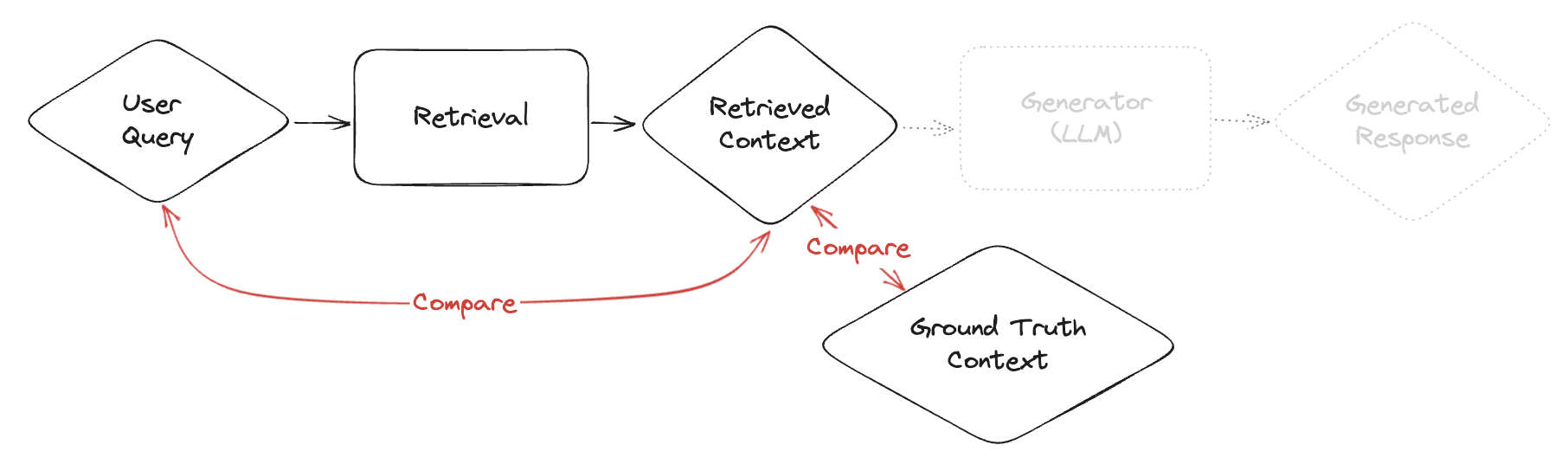
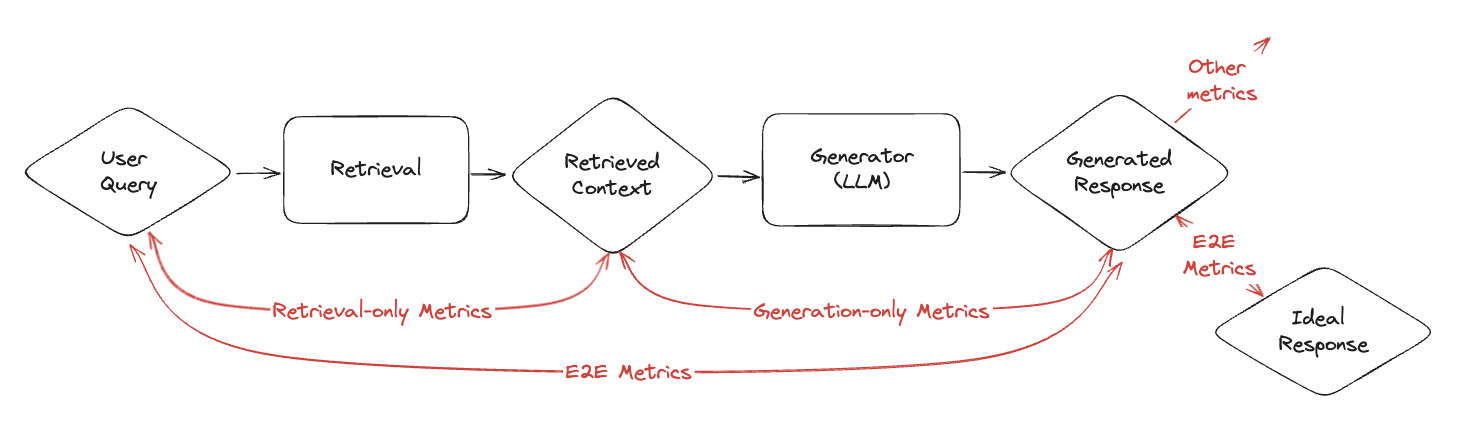 **Retrieval metrics in practice**
* **Precision**: Of the retrieved items, how many are relevant?
* **Recall**: Of the relevant items, how many were retrieved?
* **F1**: Harmonic mean of precision and recall.
* **MRR**: Average reciprocal rank of the first relevant item.
* **NDCG**: Gain discounted by rank, normalized to the ideal ordering.
**Ground‑truth dataset checklist**
* Define representative queries (cover intents, edge cases, and long‑tail).
* For each query, collect relevant documents/chunks; annotate relevance (binary or graded).
* Include plausible hard negatives to stress the retriever.
* Write labeling guidelines; consider inter‑annotator agreement.
* Split into dev/test; iterate on retriever, then re‑score.
**Retrieval metrics in practice**
* **Precision**: Of the retrieved items, how many are relevant?
* **Recall**: Of the relevant items, how many were retrieved?
* **F1**: Harmonic mean of precision and recall.
* **MRR**: Average reciprocal rank of the first relevant item.
* **NDCG**: Gain discounted by rank, normalized to the ideal ordering.
**Ground‑truth dataset checklist**
* Define representative queries (cover intents, edge cases, and long‑tail).
* For each query, collect relevant documents/chunks; annotate relevance (binary or graded).
* Include plausible hard negatives to stress the retriever.
* Write labeling guidelines; consider inter‑annotator agreement.
* Split into dev/test; iterate on retriever, then re‑score.
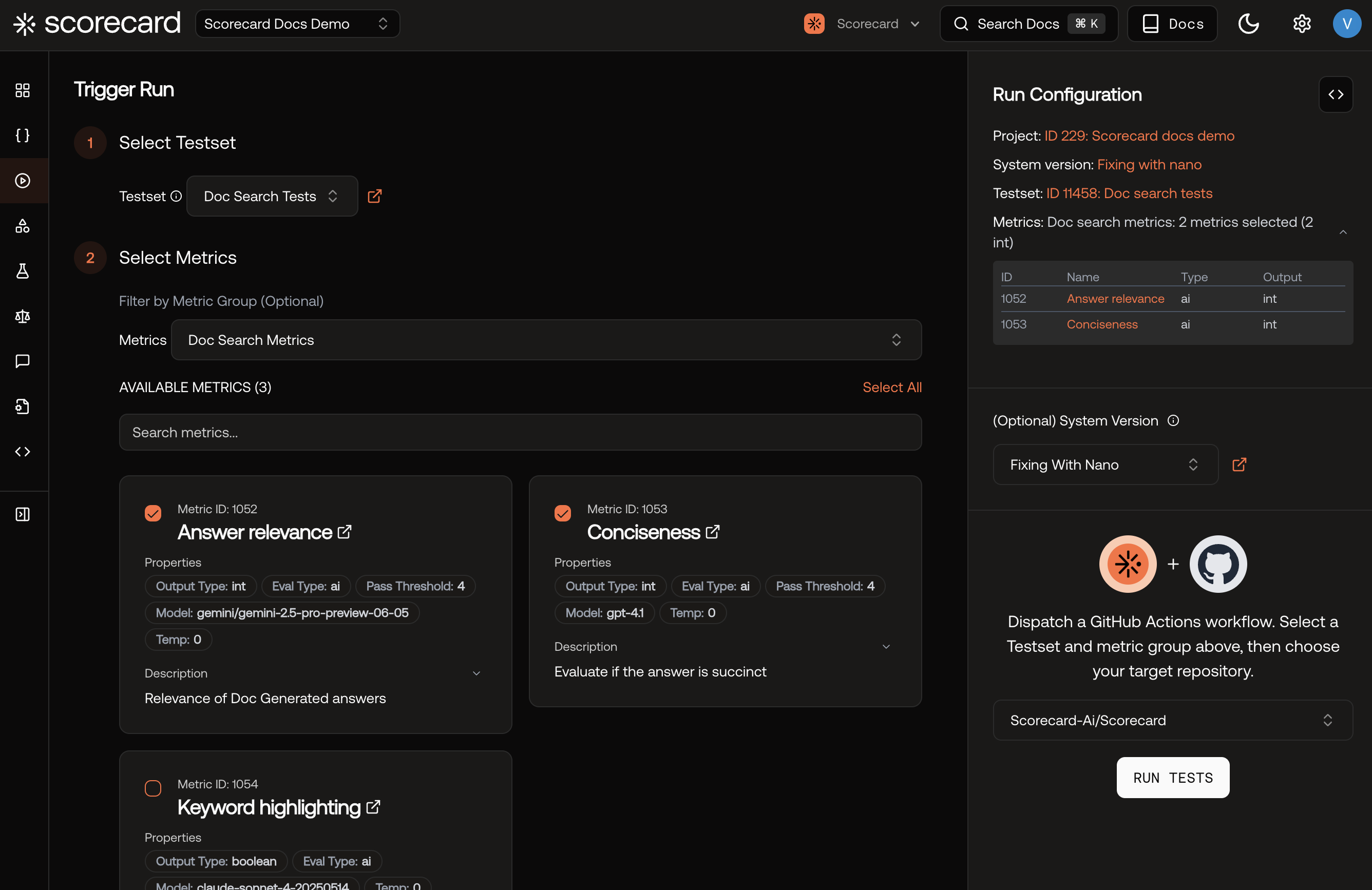 To operationalize RAG quality on live traffic, instrument traces ([Tracing Quickstart](/intro/tracing-quickstart)). Scorecard will sample spans, extract prompts/completions, and create Runs automatically.
Scorecard works alongside RAG frameworks like [LlamaIndex](https://www.llamaindex.ai/) and [LangChain](https://www.langchain.com/).
To operationalize RAG quality on live traffic, instrument traces ([Tracing Quickstart](/intro/tracing-quickstart)). Scorecard will sample spans, extract prompts/completions, and create Runs automatically.
Scorecard works alongside RAG frameworks like [LlamaIndex](https://www.llamaindex.ai/) and [LangChain](https://www.langchain.com/).